ASCII protocol generator
1 INTRODUCTION
Protocol is a simple command-line tool that serves two purposes:
- Provide a simple way for engineers to have a look at standard network protocol headers, directly from the command-line, without having to google for the relevant RFC or for ugly header image diagrams.
- Provide a way for researchers and engineers to quickly generate ASCII RFC-like header diagrams for their own custom protocols.
2 DOWNLOADING PROTOCOL
The latest version of protocol is available via GitHub. It can be downloaded directly from the following website clicking on the button "Download ZIP". https://github.com/luismartingarcia/protocol
Alternatively, the code can be checked out using GIT, running the following command:
git clone https://github.com/luismartingarcia/protocol.git
If prompted for a username and password, don't enter any, just hit Enter.
Documentation and extra information is always available through the following site: http://www.luismg.com/protocol
3 INSTALLING PROTOCOL
Protocol can be installed by running the included setup.py script as follows:
setup.py install
Note that in order to install Protocol, root or administrative privileges are required. On GNU/Linux systems, it can be installed as follows:
sudo ./setup.py install
4 RUNNING PROTOCOL
Once installed, Protocol can be run from the command line. The syntax is the following:
protocol <EXISTING_PROTOCOL_NAME(S)>
or
protocol <CUSTOM_PROTOCOL_SPECIFICATION(S)>
The following subsections describe each approach.
4.1 Displaying Existing Protocols
The first approach lets users print ASCII headers for existing network protocols. In particular, the following protocols are available.
"ethernet"            : Ethernet
"8021q"               : IEEE 802.1q
"dot1q"               : IEEE 802.1q
"tcp"                 : Transmission Control Protocol (TCP)
"udp"                 : User Datagram Protocol (TCP)
"ip"                  : Internet Protocol (IP), version 4.
"ipv6"                : Internet Protocol (IP), version 6.
"icmp"                : Internet Control Message Protocol (ICMP)
"icmp-destination":   : ICMP Destination Unreachable
"icmp-time"           : ICMP Time Exceeded
"icmp-parameter"      : ICMP Parameter Problem
"icmp-source"         : ICMP Source Quench
"icmp-redirect"       : ICMP Redirect
"icmp-echo"           : ICMP Echo Request/Reply
"icmp-timestamp"      : ICMP Timestamp Request/Reply
"icmp-information"    : ICMP Information Request/Reply
"icmpv6"              : Internet Control Message Protocol for IPv6 (ICMPv6)
"icmpv6-destination"  : ICMPv6 Destination Unreachable
"icmpv6-big"          : ICMPv6 Packet Too Big
"icmpv6-time"         : ICMPv6 Time Exceeded
"icmpv6-parameter"    : ICMPv6 Parameter Problem
"icmpv6-echo"         : ICMPv6 Echo Request/Reply
"icmpv6-rsol"         : ICMPv6 Router Solicitation
"icmpv6-radv"         : ICMPv6 Router Advertisement
"icmpv6-nsol"         : ICMPv6 Neighbor Solicitation
"icmpv6-nadv"         : ICMPv6 Neighbor Advertisement
"icmpv6-redirect"     : ICMPv6 Redirect
One or more of the protocols listed above can be printed. Here are a few examples:
- protocol tcp
- protocol dot1q
- protocol tcp udp
- protocol ipv6 icmpv6 icmpv6-redirect
Note that protocol names don't need to be fully specified, as long as there is no ambiguity. For example 'protocol et' is equivalent to 'protocol ethernet'. Whenever there is ambiguity (e.g. 'protocol icmpv6-r', a list of possible options will be displayed.
    $ protocol icmpv6-r
    Ambiguous protocol specifier 'icmpv6-r'. Did you mean any of these?
      icmpv6-radv
      icmpv6-redirect
      icmpv6-rsol
4.2 Displaying Custom Protocols
Apart from already existing protocols, Protocol can represent any arbitrary protocol headers. In order to do that, instead of specifying the name of an existing protocol, a custom protocol specification may be supplied. Such specification must follow a simple but specific syntax:
"<LIST_OF_FIELDS>[?OPTIONS]"
Where [LIST_OF_FIELDS] is a comma-separated list of protocol field names and lengths (expressed in bits), and [?OPTIONS] is an optional part that allows users to specify format modifiers for the ASCII header. Note that if any of the field names contains spaces, the protocol specification must be enclosed in double quotes.
4.2.1 Field Lists
The most important part of a protocol specification are field lists. This is just a comma-separated list of name:length tuples, where name represents the text that describes the protocol field and can contain any character, except for '?' and length is an integer greater than zero, representing the number of bits the field takes in the header. Here are a few examples:
- Type:8,Code:8,Checksum:16,Message Body:64
- Source Port:16,Destination Port:16,Length:16,Checksum:16
Note that there is no whitespace after the commas. This is a restriction that must be respected.
Also, note that field lengths don't need to align to the length of the line. If a particular field is too long, Protocol will just wrap it to the next line.
Here are some examples:
$ protocol "Source:16,TTL:8,Reserved:40"
     0                   1                   2                   3
     0 1 2 3 4 5 6 7 8 9 0 1 2 3 4 5 6 7 8 9 0 1 2 3 4 5 6 7 8 9 0 1
    +-+-+-+-+-+-+-+-+-+-+-+-+-+-+-+-+-+-+-+-+-+-+-+-+-+-+-+-+-+-+-+-+
    |             Source            |      TTL      |               |
    +-+-+-+-+-+-+-+-+-+-+-+-+-+-+-+-+-+-+-+-+-+-+-+-+               +
    |                            Reserved                           |
    +-+-+-+-+-+-+-+-+-+-+-+-+-+-+-+-+-+-+-+-+-+-+-+-+-+-+-+-+-+-+-+-+
$ protocol "Source:16,Reserved:40,TTL:8"
     0                   1                   2                   3
     0 1 2 3 4 5 6 7 8 9 0 1 2 3 4 5 6 7 8 9 0 1 2 3 4 5 6 7 8 9 0 1
    +-+-+-+-+-+-+-+-+-+-+-+-+-+-+-+-+-+-+-+-+-+-+-+-+-+-+-+-+-+-+-+-+
    |             Source            |                               |
    +-+-+-+-+-+-+-+-+-+-+-+-+-+-+-+-+               +-+-+-+-+-+-+-+-+
    |                    Reserved                   |      TTL      |
    +-+-+-+-+-+-+-+-+-+-+-+-+-+-+-+-+-+-+-+-+-+-+-+-+-+-+-+-+-+-+-+-+
$ protocol "Reserved:32,Target Address:128"
     0                   1                   2                   3
     0 1 2 3 4 5 6 7 8 9 0 1 2 3 4 5 6 7 8 9 0 1 2 3 4 5 6 7 8 9 0 1
    +-+-+-+-+-+-+-+-+-+-+-+-+-+-+-+-+-+-+-+-+-+-+-+-+-+-+-+-+-+-+-+-+
    |                            Reserved                           |
    +-+-+-+-+-+-+-+-+-+-+-+-+-+-+-+-+-+-+-+-+-+-+-+-+-+-+-+-+-+-+-+-+
    |                                                               |
    +                                                               +
    |                                                               |
    +                         Target Address                        +
    |                                                               |
    +                                                               +
    |                                                               |
    +-+-+-+-+-+-+-+-+-+-+-+-+-+-+-+-+-+-+-+-+-+-+-+-+-+-+-+-+-+-+-+-+
4.2.2 Options
Once the list of fields has been specified, users may optionally pass formatting options to control the way the ASCII header is generated.
Options are supplied as a comma-separated list of label=value elements.
The first one is preceded by the '?' sign, which lets Protocol figure out where the field list ends and where the list of options begins.
The options currently available are the following:
    bits=<n>       : Number of bits per line. By default it's 32, same as IETF.
                     This is useful for protocols that don't align perfectly to
                     32-bit words, like Ethernet.
    placeholder=<n> : The Number of placeholder unit per bit(default=1)
    numbers=<Y/N>  : Instructs protocol to print or avoid printing the bit
                     counts on top of the header.
    evenchar=<c>   : Instructs protocol to use the supplied character, instead
                     of the default "-" as the character in even positions of
                     the horizontal lines.
    oddchar=<c>    : Same as evenchar but for characters in odd positions of the
                     horizontal lines. By default it takes the value '+'
    startchar=<c>  : Instructs protocol to use the supplied character instead
                     of the default "+" for the first position of a horizontal
                     line.
    endchar=<c>    : Same as startchar but for the character in the last
                     position of the horizontal lines.
    sepchar=<c>    : Instructs protocol to use the supplied character instead
                     of the default "|" for the field separator character.
The following diagram shows the character modifiers described above.
       Bit counts                                                     sepchar(|)
         ^   ^                                                              |
         |   |                                                              |
         |   |                                                              |
         0   |               1                   2                   3      |
         0 1 2 3 4 5 6 7 8 9 0 1 2 3 4 5 6 7 8 9 0 1 2 3 4 5 6 7 8 9 0 1    |
        +-+-+-+-+-+-+-+-+-+-+-+-+-+-+-+-+-+-+-+-+-+-+-+-+-+-+-+-+-+-+-+-+   |
        |             Source            |      TTL      |    Reserved   | <-+
        +-+-+-+-+-+-+-+-+-+-+-+-+-+-+-+-+-+-+-+-+-+-+-+-+-+-+-+-+-+-+-+-+
        ^              ^ ^ ^              ^ ^ ^                         ^
        |              | | |              | | |                         |
     startchar(+)     evenchar( -)       oddchar(+)                endchar(+)

        |<------------------------------------------------------------->|
                                   bits(32)
4.3 Command-line Options
Apart from per-protocol format specifiers, Protocol can also be configured using command-line parameter. The following list provides a description of each option available.
Usage: protocol {<protocol> or <spec>} [OPTIONS]
PARAMETERS:
 <protocol>          : Name of an existing protocol
 <spec>              : Field by field specification of non-existing protocol
OPTIONS:
 -b, --bits <n>      : Number of bits per line
 -f, --file          : Read specs from a text file
 -h, --help          : Displays this help information
 -n, --no-numbers    : Do not print bit numbers on top of the header
 -V, --version       : Displays current version
 -lsb                : Print Field From Right to Left
 --evenchar  <char>  : Character for the even positions of horizontal lines
 --oddchar   <char>  : Character for the odd positions of horizontal lines
 --startchar <char>  : Character that starts horizontal lines
 --endchar   <char>  : Character that ends horizontal lines
 --sepchar   <char>  : Character that separates protocol fields
5 EXAMPLES
This section presents additional examples on how to run protocol.
$ protocol tcp
     0                   1                   2                   3
     0 1 2 3 4 5 6 7 8 9 0 1 2 3 4 5 6 7 8 9 0 1 2 3 4 5 6 7 8 9 0 1
    +-+-+-+-+-+-+-+-+-+-+-+-+-+-+-+-+-+-+-+-+-+-+-+-+-+-+-+-+-+-+-+-+
    |          Source Port          |        Destination Port       |
    +-+-+-+-+-+-+-+-+-+-+-+-+-+-+-+-+-+-+-+-+-+-+-+-+-+-+-+-+-+-+-+-+
    |                        Sequence Number                        |
    +-+-+-+-+-+-+-+-+-+-+-+-+-+-+-+-+-+-+-+-+-+-+-+-+-+-+-+-+-+-+-+-+
    |                     Acknowledgment Number                     |
    +-+-+-+-+-+-+-+-+-+-+-+-+-+-+-+-+-+-+-+-+-+-+-+-+-+-+-+-+-+-+-+-+
    | Offset|  Res. |     Flags     |             Window            |
    +-+-+-+-+-+-+-+-+-+-+-+-+-+-+-+-+-+-+-+-+-+-+-+-+-+-+-+-+-+-+-+-+
    |            Checksum           |         Urgent Pointer        |
    +-+-+-+-+-+-+-+-+-+-+-+-+-+-+-+-+-+-+-+-+-+-+-+-+-+-+-+-+-+-+-+-+
    |                    Options                    |    Padding    |
    +-+-+-+-+-+-+-+-+-+-+-+-+-+-+-+-+-+-+-+-+-+-+-+-+-+-+-+-+-+-+-+-+
$ protocol "Source Port:16,Destination Port:16,Sequence Number:32,Acknowledgment Number:32,Offset:4,Res.:4,Flags:8,Window:16,Checksum:16,Urgent Pointer:16,Options:24,Padding:8"
     0                   1                   2                   3
     0 1 2 3 4 5 6 7 8 9 0 1 2 3 4 5 6 7 8 9 0 1 2 3 4 5 6 7 8 9 0 1
    +-+-+-+-+-+-+-+-+-+-+-+-+-+-+-+-+-+-+-+-+-+-+-+-+-+-+-+-+-+-+-+-+
    |          Source Port          |        Destination Port       |
    +-+-+-+-+-+-+-+-+-+-+-+-+-+-+-+-+-+-+-+-+-+-+-+-+-+-+-+-+-+-+-+-+
    |                        Sequence Number                        |
    +-+-+-+-+-+-+-+-+-+-+-+-+-+-+-+-+-+-+-+-+-+-+-+-+-+-+-+-+-+-+-+-+
    |                     Acknowledgment Number                     |
    +-+-+-+-+-+-+-+-+-+-+-+-+-+-+-+-+-+-+-+-+-+-+-+-+-+-+-+-+-+-+-+-+
    | Offset|  Res. |     Flags     |             Window            |
    +-+-+-+-+-+-+-+-+-+-+-+-+-+-+-+-+-+-+-+-+-+-+-+-+-+-+-+-+-+-+-+-+
    |            Checksum           |         Urgent Pointer        |
    +-+-+-+-+-+-+-+-+-+-+-+-+-+-+-+-+-+-+-+-+-+-+-+-+-+-+-+-+-+-+-+-+
    |                    Options                    |    Padding    |
    +-+-+-+-+-+-+-+-+-+-+-+-+-+-+-+-+-+-+-+-+-+-+-+-+-+-+-+-+-+-+-+-+
$ protocol "Field4:4,Field4:4,Field8:8,Field16:16,Field32:32,Field64:64?bits=16,numbers=y,startchar=*,endchar=*,evenchar=-,oddchar=-,sepchar=|"
     0                   1
     0 1 2 3 4 5 6 7 8 9 0 1 2 3 4 5
    *-------------------------------*
    | Field4| Field4|     Field8    |
    *-------------------------------*
    |            Field16            |
    *-------------------------------*
    |                               |
    *            Field32            *
    |                               |
    *-------------------------------*
    |                               |
    *                               *
    |                               |
    *            Field64            *
    |                               |
    *                               *
    |                               |
    *-------------------------------*
$ protocol ip --bits 16
     0                   1
     0 1 2 3 4 5 6 7 8 9 0 1 2 3 4 5
    +-+-+-+-+-+-+-+-+-+-+-+-+-+-+-+-+
    |Version|  IHL  |Type of Service|
    +-+-+-+-+-+-+-+-+-+-+-+-+-+-+-+-+
    |          Total Length         |
    +-+-+-+-+-+-+-+-+-+-+-+-+-+-+-+-+
    |         Identification        |
    +-+-+-+-+-+-+-+-+-+-+-+-+-+-+-+-+
    |Flags|     Fragment Offset     |
    +-+-+-+-+-+-+-+-+-+-+-+-+-+-+-+-+
    |  Time to Live |    Protocol   |
    +-+-+-+-+-+-+-+-+-+-+-+-+-+-+-+-+
    |        Header Checksum        |
    +-+-+-+-+-+-+-+-+-+-+-+-+-+-+-+-+
    |                               |
    +         Source Address        +
    |                               |
    +-+-+-+-+-+-+-+-+-+-+-+-+-+-+-+-+
    |                               |
    +      Destination Address      +
    |                               |
    +-+-+-+-+-+-+-+-+-+-+-+-+-+-+-+-+
    |            Options            |
    +               +-+-+-+-+-+-+-+-+
    |               |    Padding    |
    +-+-+-+-+-+-+-+-+-+-+-+-+-+-+-+-+
$ protocol udp --oddchar "-" --startchar "-" --endchar "-"
     0                   1                   2                   3
     0 1 2 3 4 5 6 7 8 9 0 1 2 3 4 5 6 7 8 9 0 1 2 3 4 5 6 7 8 9 0 1
    -----------------------------------------------------------------
    |          Source Port          |        Destination Port       |
    -----------------------------------------------------------------
    |             Length            |            Checksum           |
    -----------------------------------------------------------------
$ protocol ipv6 --no-numbers
    +-+-+-+-+-+-+-+-+-+-+-+-+-+-+-+-+-+-+-+-+-+-+-+-+-+-+-+-+-+-+-+-+
    |Version| Traffic Class |               Flow Label              |
    +-+-+-+-+-+-+-+-+-+-+-+-+-+-+-+-+-+-+-+-+-+-+-+-+-+-+-+-+-+-+-+-+
    |         Payload Length        |  Next Header  |   Hop Limit   |
    +-+-+-+-+-+-+-+-+-+-+-+-+-+-+-+-+-+-+-+-+-+-+-+-+-+-+-+-+-+-+-+-+
    |                                                               |
    +                                                               +
    |                                                               |
    +                         Source Address                        +
    |                                                               |
    +                                                               +
    |                                                               |
    +-+-+-+-+-+-+-+-+-+-+-+-+-+-+-+-+-+-+-+-+-+-+-+-+-+-+-+-+-+-+-+-+
    |                                                               |
    +                                                               +
    |                                                               |
    +                       Destination Address                     +
    |                                                               |
    +                                                               +
    |                                                               |
    +-+-+-+-+-+-+-+-+-+-+-+-+-+-+-+-+-+-+-+-+-+-+-+-+-+-+-+-+-+-+-+-+
$ protocol udp icmp
     0                   1                   2                   3
     0 1 2 3 4 5 6 7 8 9 0 1 2 3 4 5 6 7 8 9 0 1 2 3 4 5 6 7 8 9 0 1
    +-+-+-+-+-+-+-+-+-+-+-+-+-+-+-+-+-+-+-+-+-+-+-+-+-+-+-+-+-+-+-+-+
    |          Source Port          |        Destination Port       |
    +-+-+-+-+-+-+-+-+-+-+-+-+-+-+-+-+-+-+-+-+-+-+-+-+-+-+-+-+-+-+-+-+
    |             Length            |            Checksum           |
    +-+-+-+-+-+-+-+-+-+-+-+-+-+-+-+-+-+-+-+-+-+-+-+-+-+-+-+-+-+-+-+-+

     0                   1                   2                   3
     0 1 2 3 4 5 6 7 8 9 0 1 2 3 4 5 6 7 8 9 0 1 2 3 4 5 6 7 8 9 0 1
    +-+-+-+-+-+-+-+-+-+-+-+-+-+-+-+-+-+-+-+-+-+-+-+-+-+-+-+-+-+-+-+-+
    |      Type     |      Code     |            Checksum           |
    +-+-+-+-+-+-+-+-+-+-+-+-+-+-+-+-+-+-+-+-+-+-+-+-+-+-+-+-+-+-+-+-+
    |                                                               |
    +                          Message Body                         +
    |                                                               |
    +-+-+-+-+-+-+-+-+-+-+-+-+-+-+-+-+-+-+-+-+-+-+-+-+-+-+-+-+-+-+-+-+
6 CONTACT, SUPPORT AND BUG REPORTING
For any questions, bug reports, bug fixes, feature requests, code contributions, etc, please contact me using the e-mail address displayed on the header of this file. Please note that Protocol's support is just like IP transport: best-effort. I will do my best to deal with your enquiries but no guarantees. Special support packages are available for those willing to send me real $$$ via Paypal ;-)
7 New features
protocol工具适用起来还是非常便捷的,但其目的主要是为了实现网络报文协议,所以其遵循的是网络字节序,为了实现更通用,在原作者的基础上自行又添加了一些其他功能。
-lsb
由于protocol默认字节序为大尾端,为了更通用,扩展了一个命令行参数-lsb用于实现小尾端。
默认情况下仍为大尾端,通过添加-lsb参数可以在显示时转换为小尾端,如此更加通用。
-ph
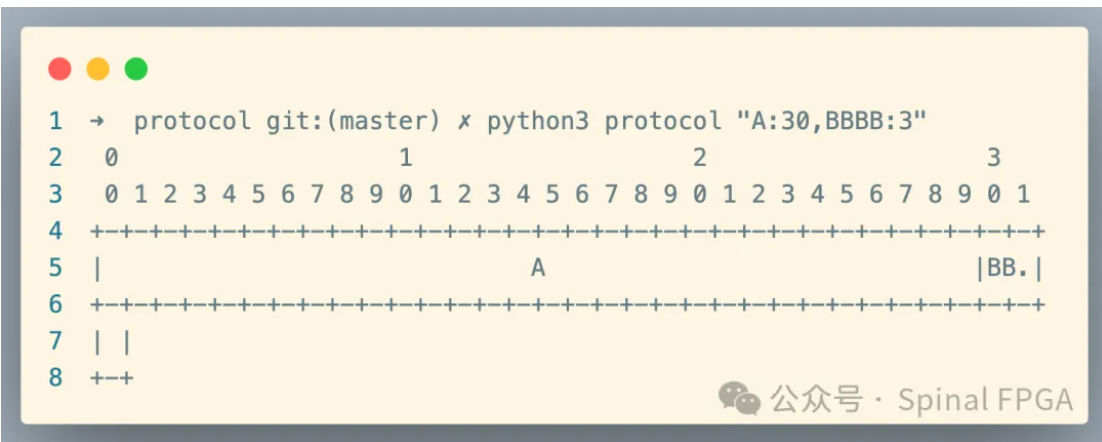 由于协议字段名称所用字符过多,导致无法显示完全,故以BB.形式进行显示。
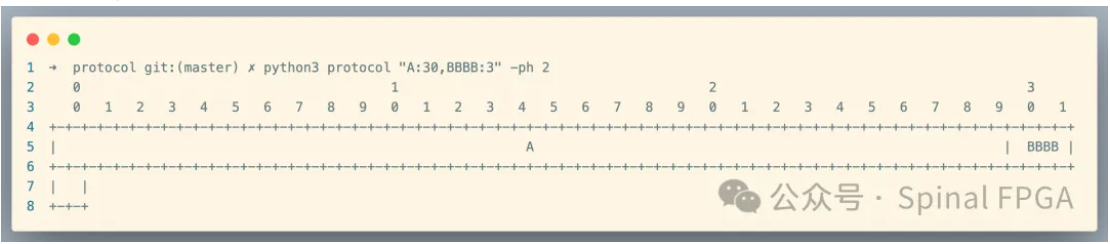
在protocol中,一个bit默认会对应两个占位符,这里以两个展位符为一个单位,通过给命令行新增一个-ph参数用于指定每个字符需要的展位符个数,以便进行调整,使用效果如下: