8 TI204c-IP Reference Designs
The TI204c-IP archive includes a number of reference designs based on standard development kits offered by Xilinx. These designs can be used in the following ways:
- They can be ported to other FPGAs of your choice (with necessary modifications)
- They can be used as a starting reference point for a completely customized JESD solution
- Components of the testbench can be used as functional models for simulations. For example, an Rx only JESD IP can use the Tx part of the reference design as the JESD transmitter model to validate the link in simulations.
All the components of the reference design (except the TI204c-IP core) are un-encrypted and can be edited for further customization.
8.1 Reference design block diagram
The block diagram below illustrates the general structure of the reference design provided to you. The reference design implements a full duplex JESD link with both the Tx and Rx IP's configured to the same JESD link parameters.
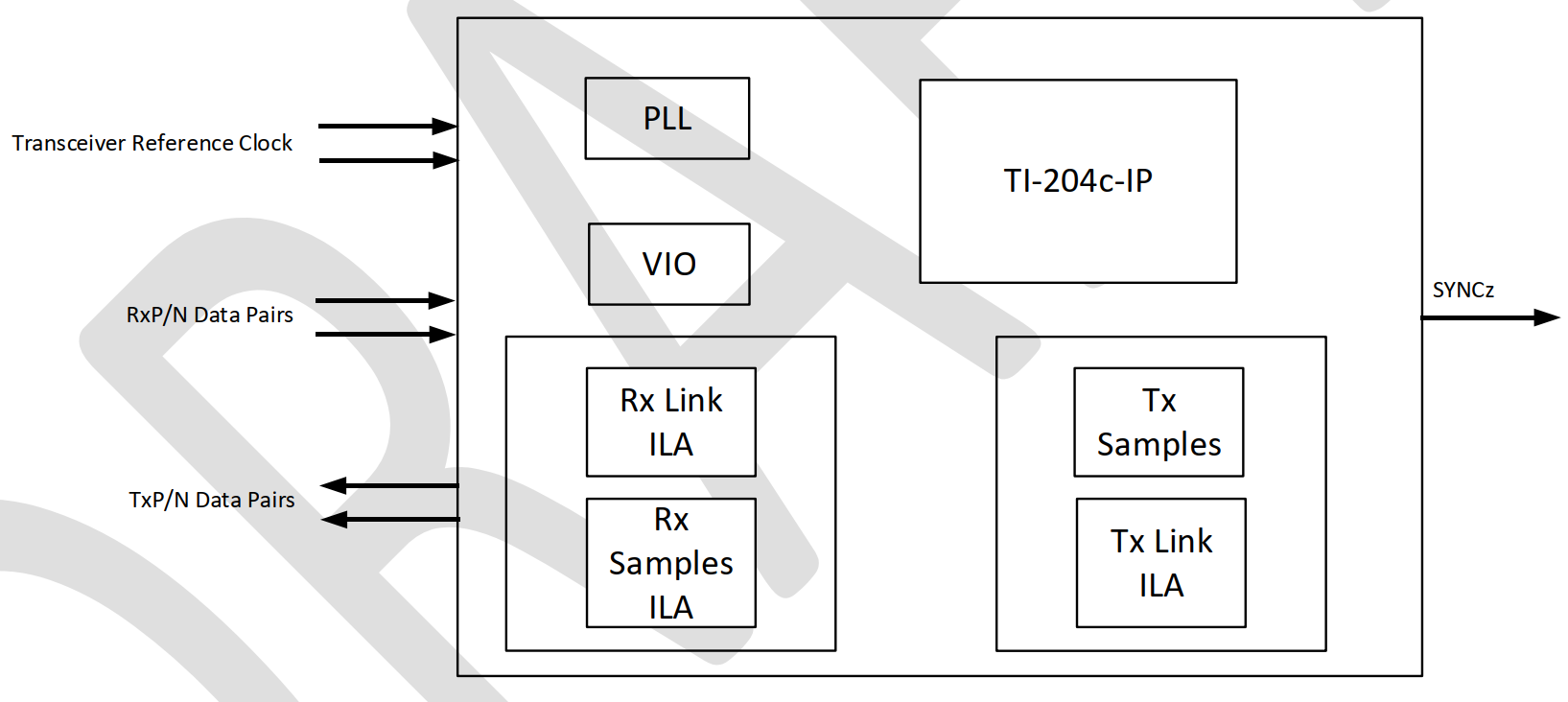
The reference design can be broken down into the following primary functional blocks:
- The TI204c JESD IP core : This is the IP configured for the targeted mode of operation.
- PLL : this is an FPGA PLL that is used to generate all the internal clocks in the design.
- VIO (virtual input output) module : This is a visibility/control module that enables the following:
- Control of signals feeding into the IP. These are primarily the resets of the JESD IP.
- Reading of static outputs from the IP. These include transceiver QPLL/CPLL/CDR locked status signals.
- Rx Reference Design
- Rx Link ILA (internal logic analyzer). This captures the Rx lane and sideband signals.
- Rx Samples ILA : This captures the Rx lane data mapped to ADC samples.
- Rx ILAS VIO (8b/10b modes only): This VIO captures the ILAS configuration octets captured by the receiver during the lane initialization sequence of the 8b/10b JESD link.
- Tx Reference Design
- Tx samples : This logic generates a simple 64 point sine/cosine wave that is fed to the Tx IP.
- Tx Link ILA (internal logic analyzer). This captures the Tx lane data and sideband signals.
8.1.1 Reference Design Datapaths
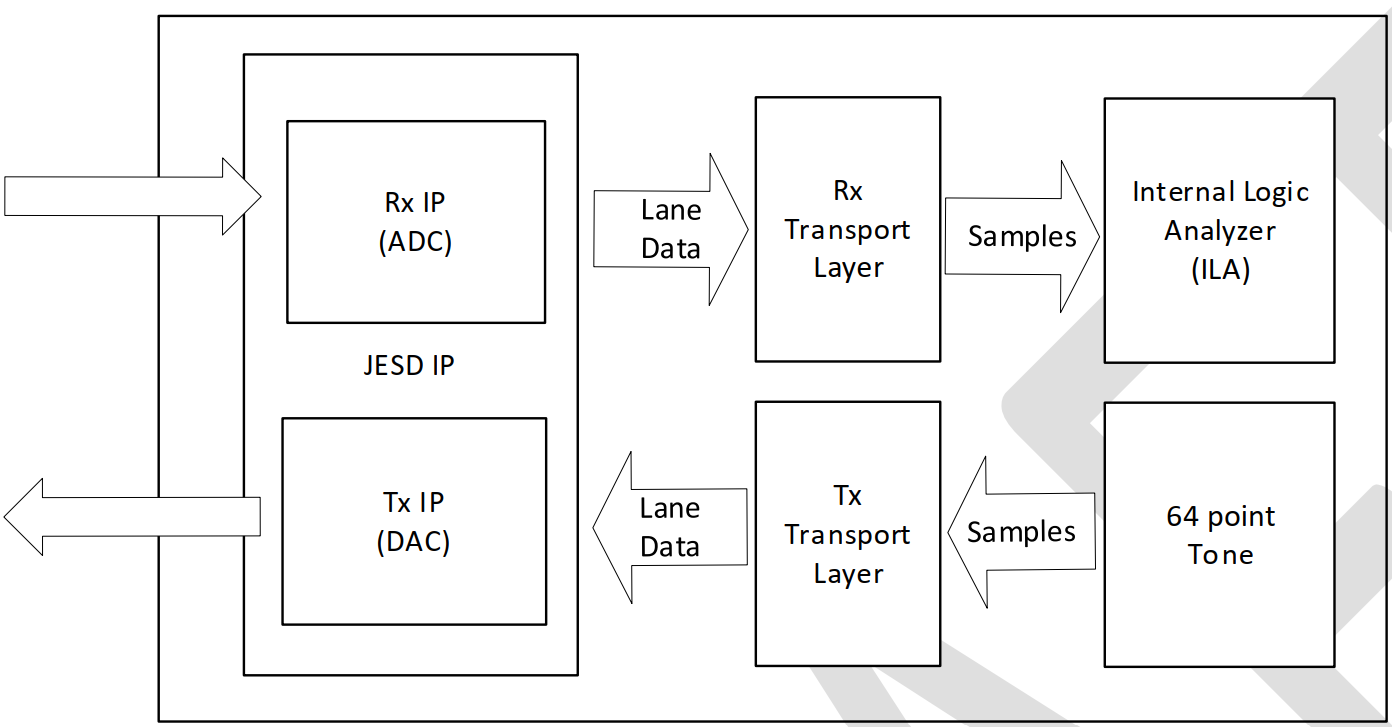
The primary Tx and Rx datapaths consists of the following sub-modules:
- Rx IP (ADC) Data-path
- The JESD Rx IP. This is part of the TI204c JESD IP Core.
- The Rx Transport Layer. This logic maps the lane data to samples.
- Samples buffer. This is implemented using an internal logic analyzer. The captured samples can be exported to a CSV file using Vivado.
- Tx IP (DAC) Data-path
- The JESD Tx IP. This is part of the TI204c JESD IP Core.
- 64 point tone. This module generates samples that emulate 16bit 64 point sine/cos tones. The samples can be attenuated in amplitude by a factor of 1/2/4 and 8.
- The Tx Transport Layer. This logic maps the samples to the lane data that is received by the JESD Tx IP.
8.1.2 Reference Design Loopback Test Environment
The Reference designs have been architected to have the Tx and Rx IP's connected in a loopback fashion to generate a standalone system that does not need to interface with an actual ADC / DAC / AFE EVM or simulation model. The loopback connections are illustrated in the following figure.
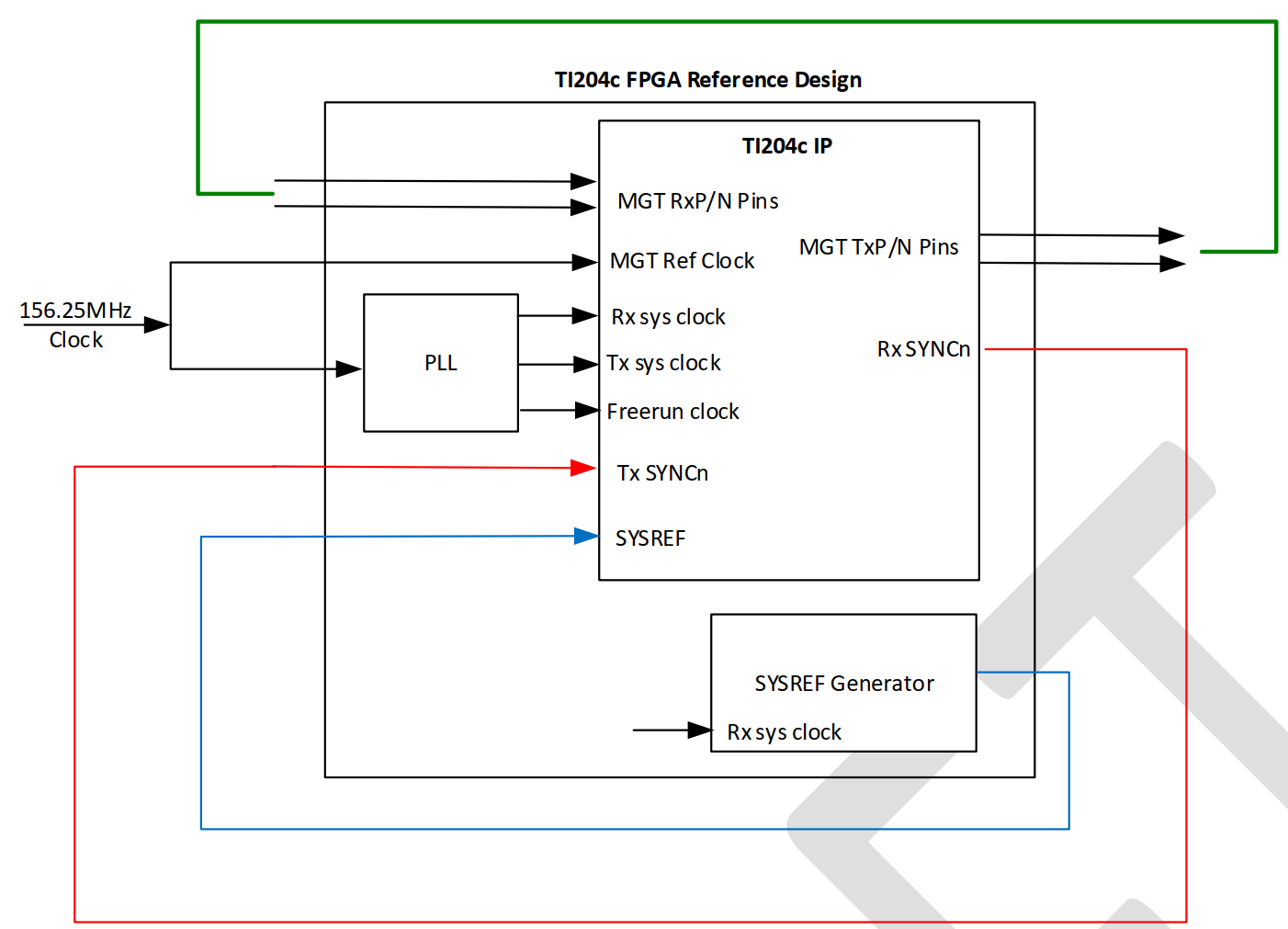
The primary loopback paths are illustrated in various colors in the figure above, and the details of the same are listed in the following points:
- There is a 1-1 loopback on all the Tx and Rx lanes. For example, Tx[0] is mapped to Rx[0], Tx[1] is mapped to Rx[1], and so on.
- The Rx SYNCn signal is looped back to the Tx SYNCn signal. This is applicable only in the case of 8b/10b designs.
- The SYSREF Generator block emulates the typical functionality of a clocking chip, and the SYSREF is looped back to the corresponding input of the Tx and Rx IPs. For the purpose of accurate timing, the SYSREF is generated using the same clock that is connected to the
rx_sys_clockandtx_sys_clockinputs of the JESD IP core.
8.1.2.1 Reference Design Loopback Hardware
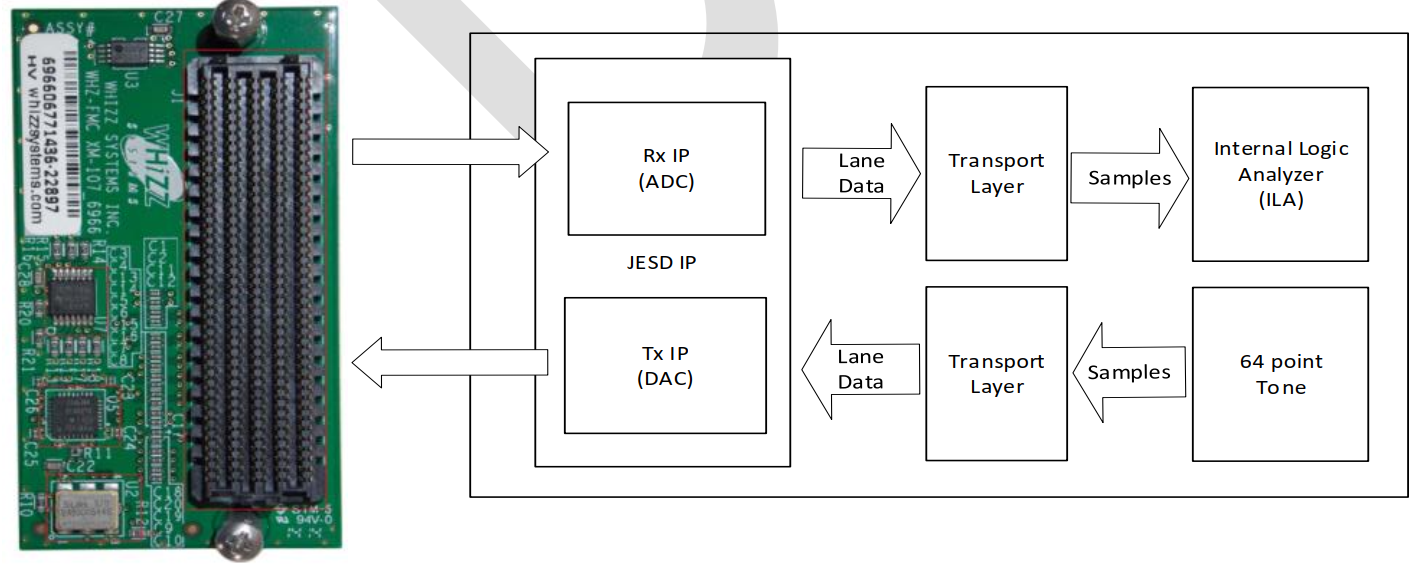
The reference designs implement loopback using a Whizz Systems XM107 FMC loopback test card. The link to the card schematics can be found in section 9 of this user guide.
8.2 Reference Design List
The TI204c IP reference designs have been categorized based on the transceiver architecture (GTP/GTY/GTH/GTX) instead of FPGA families. This is because multiple FPGA parts across different families may contain a certain class of transceiver. As a result, a reference design based on that class can easily be ported to any target FPGA containing that particular transceiver.
The table below lists all the reference designs included with the TI204c IP archive. The last column in the table lists the possible FPGAs that each reference design can map to.
| Protocol | Reference Design Name | Lane Rate | DevKit | LMFS | K/E | Transceiver Class | Target FPGAs |
|---|---|---|---|---|---|---|---|
| 8b/10b | zcu102_8b10b | 12.5 Gbps | zcu102 | 8-8-2-1 | 32 | GTH | Zynq UltraScale+, Kintex UltraScale+, Virtex UltraScale, Kintex UltraScale, Virtex-7 |
| vcu118_8b10b | 12.5 Gbps | vcu118 | 8-8-2-1 | 32 | GTY | Virtex UltraScale+, Kintex UltraScale+, Zynq UltraScale+ | |
| zc706_8b10b | 6.25 Gbps | zc706 | 8-8-2-1 | 32 | GTX | Kintex-7, Zynq7000, Virtex-7, Artix-7* | |
| 64b/66b | zcu102_64b66b | 10.3125 Gbps | zcu102 | 8-8-2-1 | 3 | GTH | Zynq UltraScale+, Kintex UltraScale+, Virtex UltraScale, Kintex UltraScale, Virtex-7 |
| vcu118_64b66b | 10.3125 Gbps | vcu118 | 8-8-2-1 | 3 | GTY | Virtex UltraScale+, Kintex UltraScale+, Zynq UltraScale+ | |
| vcu118_64b66b_2 | 20.625 Gbps | vcu118 | 4-8-4-1 | 3 | GTY (128 bit) | Virtex UltraScale+, Kintex UltraScale+, Zynq UltraScale+ | |
| zc706_64b66b | xx | zc706 | - | - | GTX | Refer notes below |
There are a few important things that need to be noted:
- Mapping between Transceivers and FPGAs
- A particular class of FPGAs may contain more than one class of transceivers. For example the Kintex UltraScale+ family can contain both GTH and GTY class transceivers.
- A particular class of transceivers may be present in more than one FPGA family. For example, the GTH class transceiver can be found in Zynq UltraScale+, Kintex UltraScale+, Kintex UltraScale as well as Virtex7 families.
- Always ensure that you select the reference design based on the transceiver class that is connected to the dataconverter.
- The GTX class reference design also applies for the GTP transceivers (found on Artix-7 FPGAs).
- The
vcu118_64b66b_2reference design demonstrates the 128 bit/lane capability of the JESD IP. This allows extremely high lane rates while keeping the user logic clock rates low, thus enabling easier timing closure constraints. - The
gtx_8b10breference design uses anrx_sys_clockof 156.25MHz, while the requiredrx_sys_clockis 78.125MHz. This design showcases the ability of the Rx JESD IP to maintain an accurate data output by using thelane_data_validsignal to indicate when the lane data is to be honored/discarded. This functionality is explained in section 6.4.7. - While this is not explicitly listed, TI does support 64b/66b solutions for the GTX class transceivers. However, this is a very customized solution and you are requested to reach out to TI support for a special delivery of the same.
8.3 Reference Design Hierarchy
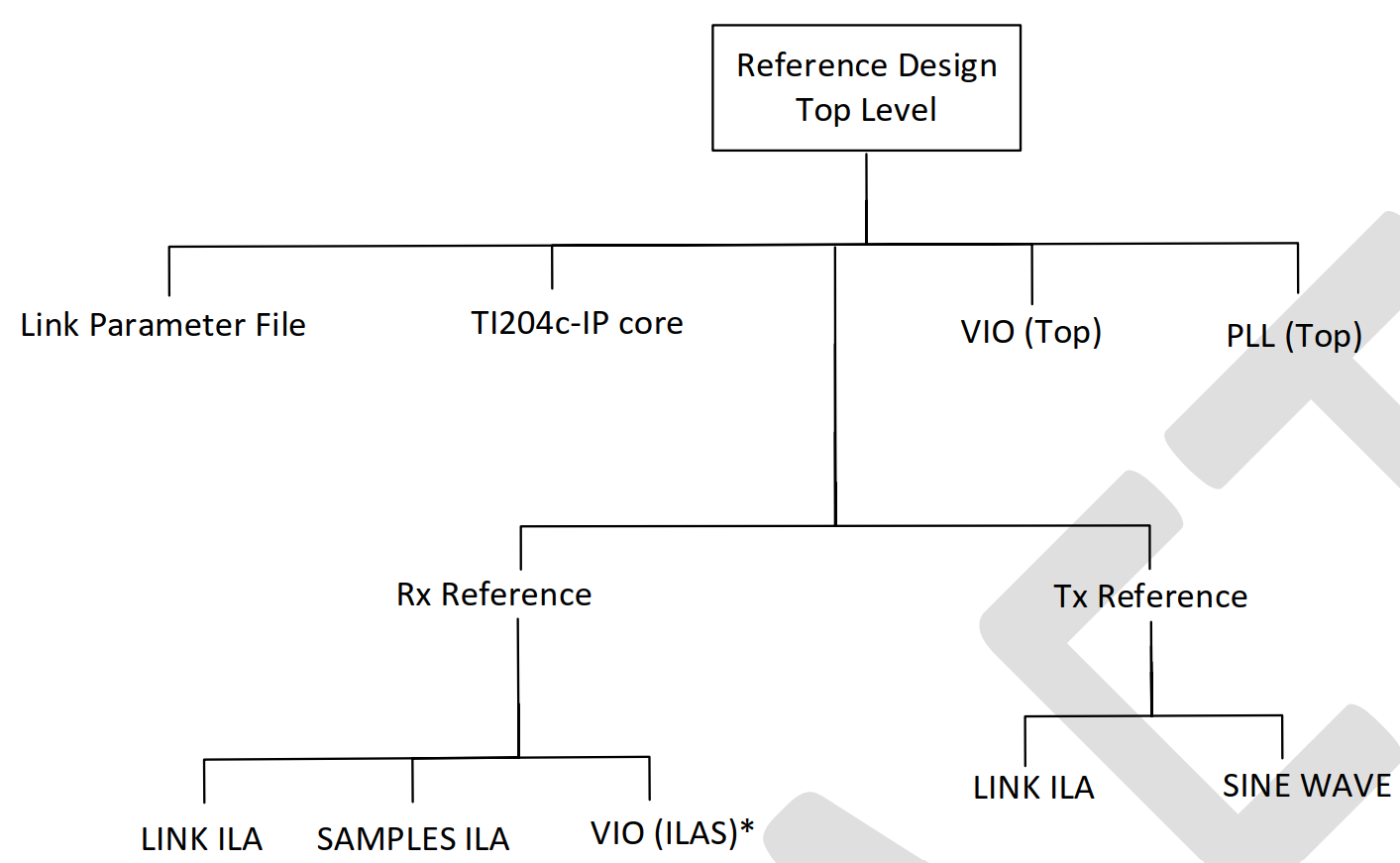
Each reference design implements a standard hierarchy (as illustrated below). The TI204c IP core is the encrypted JESD IP, and the rest of the modules are part of the reference design. The entire Reference Design is functional when compiled stand-alone for an FPGA, and does not need any additional logic.
 *
*
Notes:
- The 'Link Parameter File' is a .vh (Verilog header/include) file that essentially sets all the customization parameters of the TI204c-IP core for the reference design.
- Most of the functionality of the TI204c-IP can be modified / controlled by editing this parameter file.
- There is an extra VIO provided in the Rx reference design, and is instantiated only in 8b/10b mode. This VIO captures the 14 ILAS config octets received by the Rx IP during the ILAS sequence of the link bring-up phase.
- The LINK ILA and the VIO (ILAS) have a limit of capturing relevant data for up to 8 lanes. This has been kept limited to 8 to reduce the resource usage in the FPGA, but if necessary it can be modified to account for IP's with a larger number of lanes.
- The Tx LINK ILA has a limit of capturing relevant data for up to 8 lanes. This has been kept limited to 8 to reduce the resource usage in the FPGA, but if necessary it can be modified to account for IP's with a larger number of lanes.
8.4 Core IP Archive File Structure
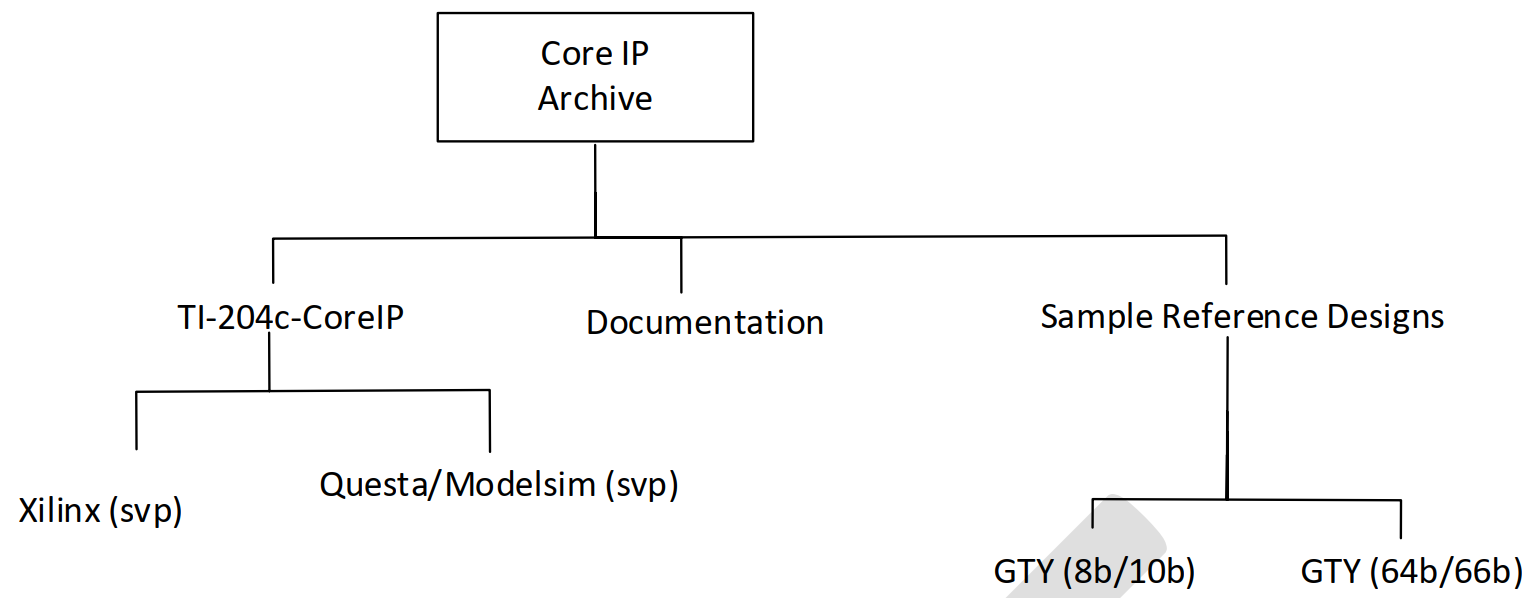
The directory structure of the Core IP archive is illustrated in the figure below.
Notes:
- The TI204c-IP design contains two primary directories:
- The JESD IP core. This is provided as an encrypted svp file. There are two flavors of the encrypted svp file of the TI204c-IP core:
TI204c-IP_xilinx.svp: meant for all Vivado based tool flowsTI204c-IP_questasim.svp: meant for Questa/Modelsim simulations
- Example Reference Designs
- These directories contain all the files (except the JESD IP core) needed for compilation and bit-file generation.
- The JESD IP core. This is provided as an encrypted svp file. There are two flavors of the encrypted svp file of the TI204c-IP core:
8.5 Loading the Reference design in Vivado
Launch Vivado (2019.x or higher) and open a new project with the name of your choice.
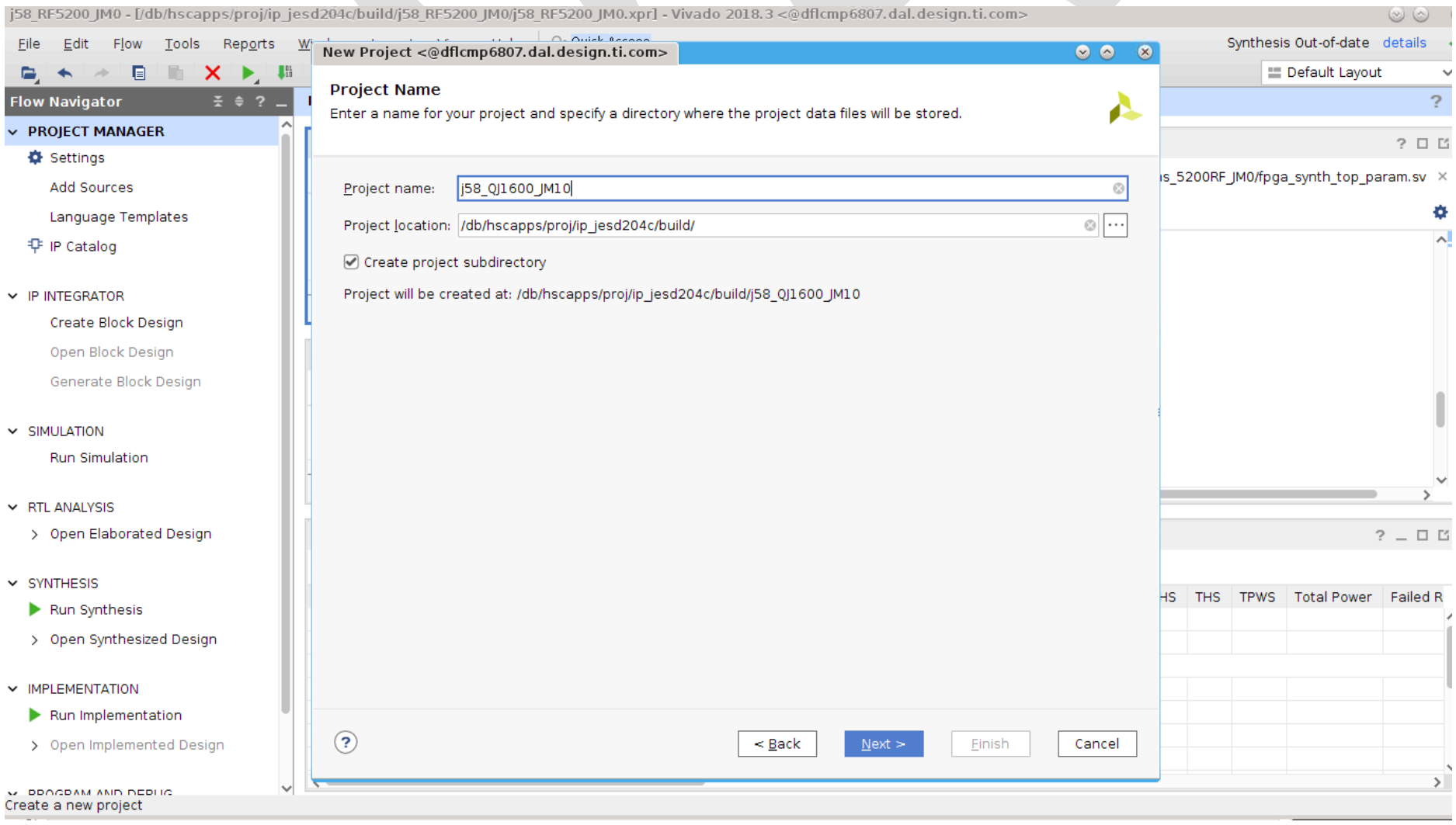 Set the FPGA part number by selecting the targeted DevKit listed in section for the chosen reference design (8.2).
- Read the following design/source files into Vivado:
- The
TI_204c_IP_xilinx.svpfrom the CoreIP RTL directory. - All the .sv, .vh and .xci files provided in the Reference Design Directory.
- Remember to exclude the Questa/Modelsim svp file, as it is meant only for simulations.
- The
- Set the top level to
TI_204c_IP_ref(this should get set automatically by Vivado). - Read the provided constraints file and set it as the target.
- For the Xilinx IP, a few additional steps may need to be carried out:
- If the IP shows a 'locked' status, right-click and select Upgrade IP, leaving core container disabled.
This step will load all the necessary files of the reference design into Vivado and link across the modules to indicate if any instances lack a reference module. The design flow can now be executed to generate the bitfile for the reference design.
8.6 Testing the Reference Design
The bitfile generated for the reference design can be tested using the following steps:
- Install the Whizz loopback card on the FMC connector of the targeted Xilinx DevKit board.
- Program the FPGA with the bitfile.
- The VIO in the reference design is set up to keep the JESD IP in reset when the FPGA completes programmation.
- The master reset signal (
master_reset_n) is held to its active value '0'. - The individual Rx/Tx IP resets (
rx_sync_reset_vio/tx_sync_reset_vio) are held to the active value '1'.
- The master reset signal (
- Steps to release the JESD IP (using the VIO):
- Set the
master_reset_nsignal to '1'. - The QPLL0 locked signals should now all read as '1' (indicating that the transceiver PLL is generating the targeted line rate).
- Set the
tx_sync_reset_viosignal to '0'. This releases the Tx JESD IP from reset and it starts transmitting data over all the lanes. - Set the
rx_sync_reset_viosignal to '0'. This releases the Rx JESD IP from reset.
- Set the
- Once the above steps are complete the JESD Rx IP is expected to lock into the data stream from the Tx, and all the lanes are released in a synchronized manner at the multi-frame or extended multi-block boundary.
- The values exported by the lanes (and the relevant error signals) can be monitored using the ILA provided in the reference design.
- The samples extracted from the lane data can be monitored using the SAMPLES ILA instance in the reference design.
- The reference design also contains support for testing deterministic latency (as described in Section 6.8).
- The
cfg_rx_buffer_release_delayandrx_lcmc/lmfc_to_buffer_release_delaysignals are mapped to the VIO for calibrating and fixing the deterministic delay of the link.
- The
8.7 Mapping the reference design to a different FPGA or DevKit
Once the reference design has been compiled and tested on the original supported DevKit, it can now be transitioned to any other FPGA or DevKit using the following steps:
- Open the transceiver wizard and note down all the settings on all the pages of the wizard. This will be important in step (4) below, because the same settings will need to be created for the transceiver on the new FPGA.
- Save the original tested project as a new project with the new FPGA / DevKit set as the target device/board. Choose the option to copy all the source files, IPs and constraints.
- Vivado may lock the IPs when the new project is created, but they can be upgraded using the same steps as listed in the steps for loading and compiling the original reference design.
- Important: While most Xilinx macro IPs port seamlessly across FPGA families, the same does not apply for the transceivers. In this case, it is important that you create a new transceiver IP using the transceiver wizard. The settings saved in Step 1 must be used as a reference to generate the new transceiver IP.
- Your project should now be ready for compilation on the targeted FPGA/board.