Board Setup and Configuration
Board Component Location
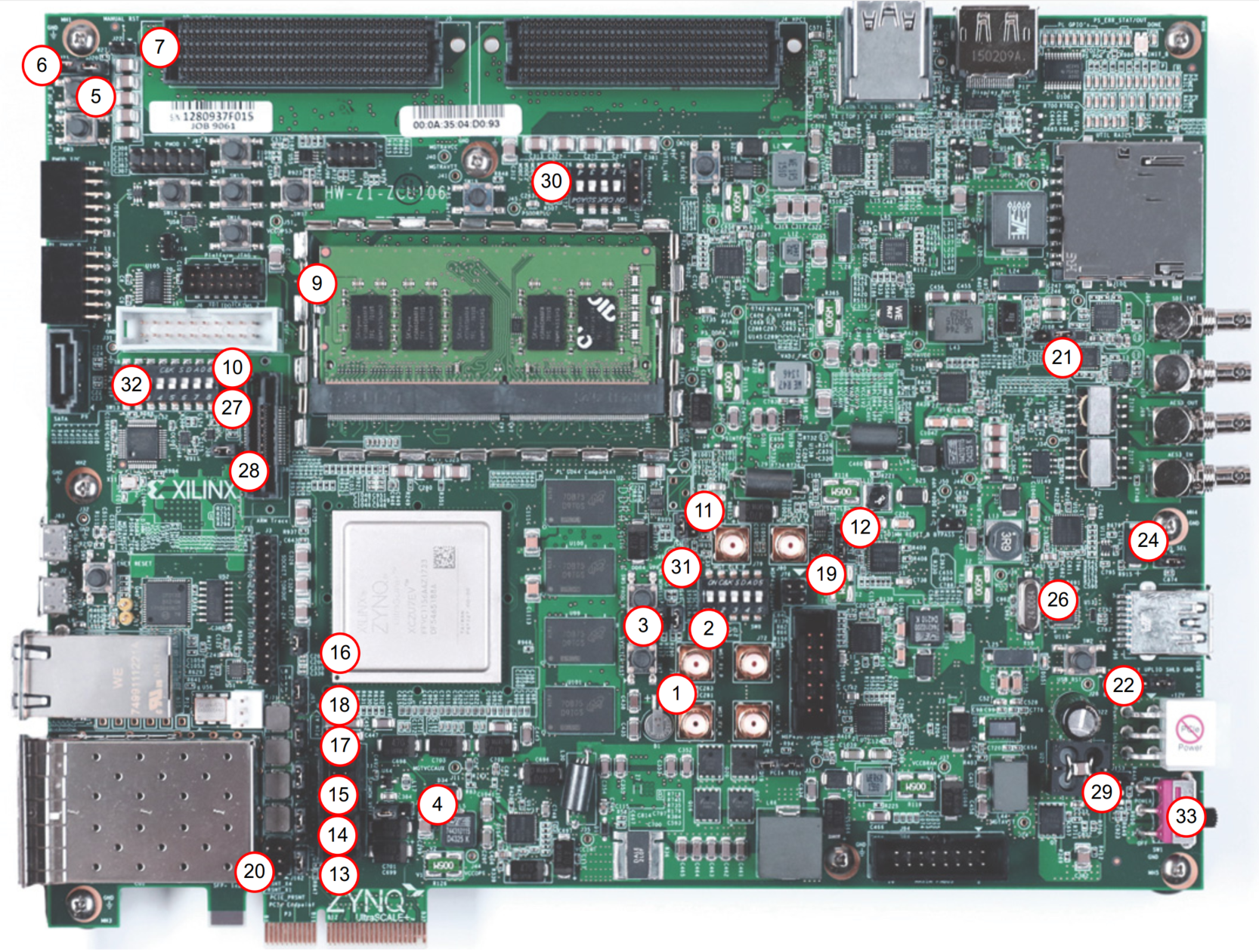
Figure 2-1 shows the ZCU106 board component locations. Each numbered component shown in the figure is keyed to Table 2-1. Table 2-1 identifies the components, references the respective schematic (0381770) page numbers, and links to a detailed functional description of the components and board features in Chapter 3.
IMPORTANT: Figure 2-1 is for visual reference only and might not reflect the current revision of the board.
IMPORTANT: There could be multiple revisions of this board. The specific details concerning the differences between revisions are not captured in this document. This document is not intended to be a reference design guide and the information herein should not be used as such. Always refer to the schematic, layout, and XDC files of the specific ZCU106 version of interest for such details.
Electrostatic Discharge Caution
CAUTION! ESD can damage electronic components when they are improperly handled, and can result in total or intermittent failures. Always follow ESD-prevention procedures when removing and replacing components.
To prevent ESD damage:
- Use an ESD wrist or ankle strap and ensure that it makes skin contact. Connect the equipment end of the strap to an unpainted metal surface on the chassis.
- Avoid touching the adapter against your clothing. The wrist strap protects components from ESD on the body only.
- Handle the adapter by its bracket or edges only. Avoid touching the printed circuit board or the connectors.
- Put the adapter down only on an antistatic surface such as the bag supplied in your kit.
- If you are returning the adapter to Xilinx Product Support, place it back in its antistatic bag immediately.
Table 2-1: ZCU106 Board Component Locations
| Callout Number | Ref. Des. | Feature ([B] = bottom of board) | Notes | Schematic Page |
|---|---|---|---|---|
| 1 | U1 | Zynq UltraScale+ XCZU7EV MPSoC, GTH Transceivers, PS GTR Transceivers | XCZU7EV-2FFVC1156 | 2 |
| 2 | J1 | PS-Side: DDR4 SODIMM Socket, with DDR4 SODIMM | LOTES ADDR0067-P001A, Micron MTA4ATF51264HZ-2G6E1 | 24 |
| 3 | U2, U99-U101 | PL-Side: DDR4 Component Memory, (4 Gb) | Micron MT40A256M16GE-075E | 26-29 |
| 4 | U119, U120 | Quad SPI Flash Memory (MIO 0-12) [B] | Micron MT25QU512ABB8ESF-OSIT | 53 |
| 5 | U116, J96 | USB 3.0 Transceiver and USB 2.0 ULPI PHY (USB 3.0 A connector) | SMSC USB3320-EZK, KYCON KMMX-AB10-SMTB30TR | 58 |
| 6 | J100 | SD Card Interface | Hirose DMIAA-SF-PET(21) | 54 |
| 7 | U152, J2 | Programmable Logic JTAG Programming Options | FTDI FT232HL-REEL, Hirose ZX62D-AB-5P8 | 22 |
| 8 | U69 | SI5341B 10 Independent Output Any-Frequency Clock Generator [B] | Silicon Labs SI5341B-B05071-GM | 44 |
| 9 | U42 | Programmable User Clock [B] | Silicon Labs SI570BAB001614DG | 45 |
| 10 | U56 | Programmable User MGT Clock, Cooling Fan Connector | Silicon Labs SI570BAB000544DG | 45 |
| 11 | U20 | SFP/SFP+ Clock Recovery [B] | Silicon Labs SI5328B-C-GMR | 46 |
| 12 | U98, P12 | GEM3 Ethernet (MIO 64-77), 10/100/1000 MHz Tri-Speed Ethernet PHY | TI DP83867IRPAP, Halo HFJ11-1G01E-L12RL | 59 |
| 13 | U40, J83 | CP2108 USB UART Interface | Silicon Labs CP2108-B02-GM, Hirose ZX62D-AB-5P8 | 47 |
| 14 | U94, P7 | HDMI Video Output [B] | TI SN65DP159RGZ, TE Connectivity 1888811-1 | 40 |
| 15 | U19, P7 | HDMI Video Output | TI TMDS181IRGZT, TE Connectivity 1888811-1 | 41 |
| 16 | U60, U61, U97 | I2C0 (MIO 14-15), I2C0 bus switch and two expanders [B] | TI PCA9544ARGYR, Two each TI TCA6416APWR | 64 |
| 17 | U34, U135 | I2C1 (MIO 16-17), I2C1 bus switches [B] | Two each TI TCA9548APWR | 65 |
| 18 | P1, P2 | SFP/SFP+ Connectors | Molex 74441-0010 | 38-39 |
| 19 | U41 | TI MSP430 System Controller [B] | TI MSP430F5342 | 43 |
| 20 | J87 | User PMOD GPIO Headers | SULLINS PBC36DAAN | 62 |
| 21 | J160, J55 | User PMOD GPIO Headers | SULLINS PPPC062LJBN-RC | 56 |
| 22 | DS37-DS44 | User I/O, Power and Status LEDs | GPIO LEDs, GREEN 0603 | 60 |
| 23 | SW13 | User I/O DIP switch | C&K SDA08H1SBD | 60 |
Default Jumper and Switch Settings
Figure 2-2 shows the ZCU106 board jumper header and DIP switch locations. Each numbered component shown in the figure is keyed to Table 2-2 or Table 2-3 (for default switch settings). Both tables reference the respective schematic (0381770) page numbers.